如下图所示,
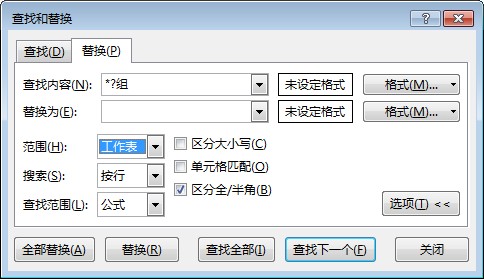
excel内置的查找功能具有很强大的功能,不仅可以在当前工作表中进行查找,还可以在整个工作簿中查找。
不仅可以精确查找还可以模糊查找。
当需要在遍历满足某个条件的所有单元格时,可以在vba中使用查找替换来遍历,省去了逐个单元格遍历的麻烦。
但是vba中只提供了Range对象的Find方法,没有提供在工作簿中查找的方法。
如果需要在工作簿中应用查找替换方法,可以遍历工作簿中的所有工作表,在每个工作表中使用查找替换方法。
代码如下:
Sub QQ1722187970()
    Dim oRng As Range
    Dim oWK As Worksheet
    '遍历每个工作表
    For Each oWK In Excel.Worksheets
        '在有数据的单元格查找
        With oWK.UsedRange
            '找到第一个满足条件的单元格
            Set oRng = .Find("*?组")
            If Not (oRng Is Nothing) Then
                '保存第一个找到的单元格的地址
                firstAddress = oRng.Address
                '开始执行代码
                Do
                    '循环每一个满足条件的单元格
                    Set oRng = .FindNext(oRng)
                    '开始执行代码
                    '直到回到第一个被找到的单元格
                Loop Until oRng Is Nothing Or oRng.Address = firstAddress
            End If
        End With
    Next
    MsgBox "操作完成"
End Sub
当然也可以使用字典对象来判断查找替换的终点
如下代码所示
Sub QQ1722187970()
    Application.ScreenUpdating = False
    Dim oRng As Range
    Dim oWK As Worksheet
     Set oDic = CreateObject("Scripting.Dictionary")
    For Each oWK In Excel.Worksheets
        oDic.RemoveAll
        With oWK.UsedRange
            Debug.Print oWK.Name
            Set oRng = .Find("*?组")
            If Not (oRng Is Nothing) Then
                firstAddress = oRng.Address
               oDic.Add firstAddress, oRng.Value

                Do
                    Set oRng = .FindNext(oRng)

If oDic.exists(oRng.Address) Then Exit Do
 oDic.Add oRng.Address, oRng.Value
                    Loop Until oRng Is Nothing Or oRng.Address = firstAddress
                End If
                arrKey = oDic.keys
                arrItem = oDic.items
                For i = 0 To UBound(arrItem)
                    If Right(arrItem(i), 1) = "组" And Len(arrItem(i)) > 1 Then
                        .Range(arrKey(i)).Value = VBA.Replace(arrItem(i), "组", "")
                    End If
                Next i
            End With
        Next
        MsgBox "替换完成"
        Application.ScreenUpdating = True
End Sub


发表评论